Editor’s Note: At iboltwatch.com, we consistently monitor legacy hardware performance to provide accurate technical troubleshooting for our readers. This article was updated to reflect severe server side pairing failures and component scarcity documented throughout this year. We highly recommend recycling any failing first generation units through certified e-waste programs.
Here is quick way to know that “What is Apple Watch 7000 Series”?
| QUICK ANSWER: Apple Watch 7000 Series is NOT a watch model. It refers to the grade of aluminum (7000 series alloy) used in the original Apple Watch (2015), Series 1, and Series 2. If your watch says “7000 Series” on the back, you have a 10+ year old device that can no longer pair with modern iPhones. |
Is it “Series 7” or Something Else?

Many people buy a watch labeled “7000 Series” on eBay or a second hand shop, thinking they got a great deal on the Apple Watch Series 7. That is a painful mistake. The “7000” has nothing to do with the model number.
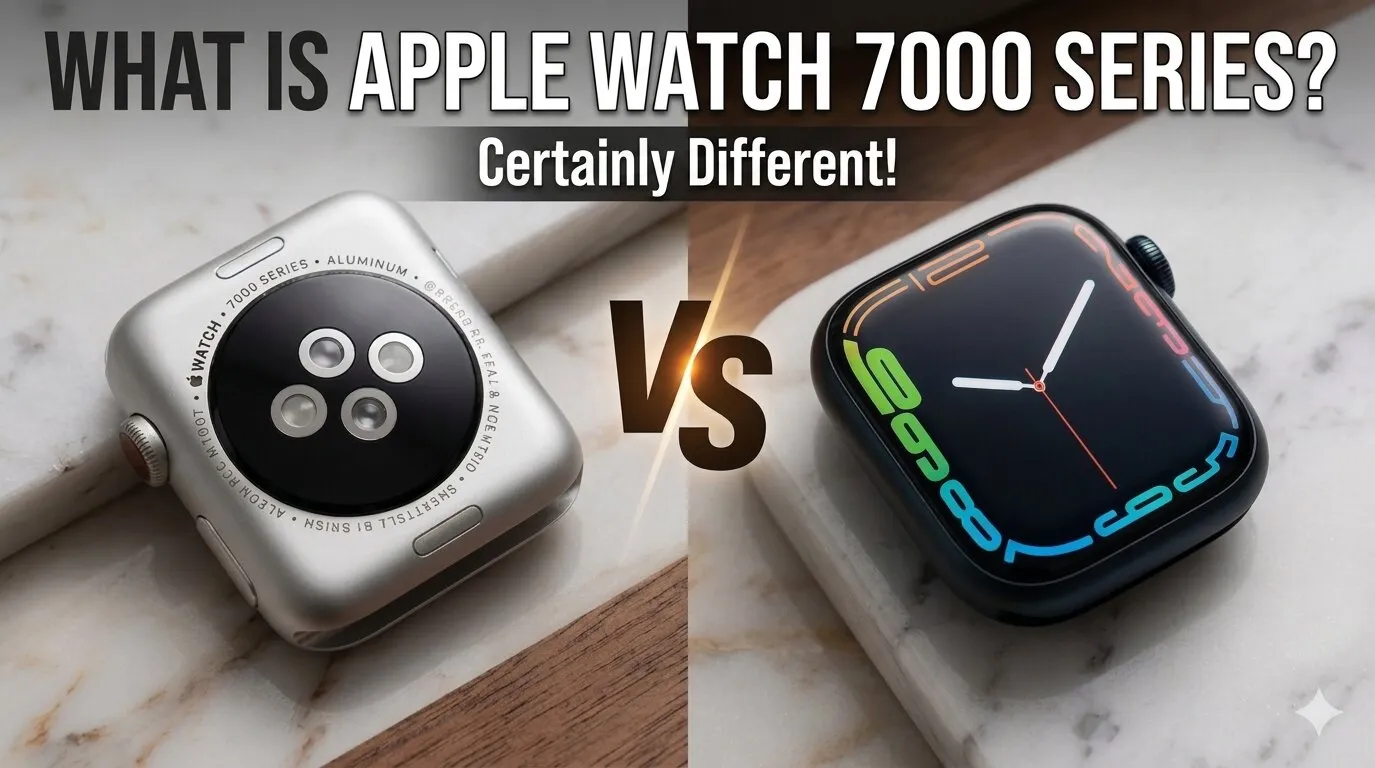
The 7000 Series simply means the watch body is made from 7000 grade aluminum alloy. Apple used this material in three older models: the original Apple Watch (2015), Apple Watch Series 1, and Apple Watch Series 2.
Real identity check: Look at the back of your watch. If it says “7000 Series,” you most likely have Apple’s very first generation watch , often called “Series 0” by tech fans. It is from 2015.
People waste money every day on this confusion. Sellers on eBay list these watches as “Apple Watch 7000 Series” without clarifying it is a decade old device. You deserve to know the truth before you buy.
| What You See | What It Actually Means | Year Released |
| 7000 Series (on back of watch) | Material grade, NOT a model name | 2015 to 2017 |
| Apple Watch Series 7 | A completely different, newer watch | 2021 |
| Apple Watch Series 1 | May also say 7000 Series on back | 2016 |
The Science Behind the “7000 Series” Aluminum

Apple made a smart engineering choice in 2015. They used a zinc reinforced aluminum alloy for the watch case. This made the watch 60% stronger than standard 6000 series aluminum used in most phones and laptops at the time.
Why Apple Switched from 6000 to 7000 Grade Alloy
Standard 6000 series aluminum is lightweight but dents and bends under pressure. The 7000 series added zinc to the mix. The result was a harder, more scratch resistant material that could handle daily wear and minor drops better than its predecessor.
Apple even used the same 7000 series alloy in the original iPhone 6 body. However, newer Apple Watches from Series 3 onward use a recycled aluminum alloy that is lighter and just as strong , without the extra zinc.
Pitting and Corrosion: How 7000 Series Ages After 10 Years
Here is the gap that most tech websites miss. After 10+ years of daily wear, the 7000 series aluminum develops tiny pits on the surface. This is called “aluminum pitting,” and it happens due to long term sweat and salt exposure.
You may notice small holes or rough patches on older watch cases, especially near the band slots. This does not make the watch dangerous to wear, but it does show the material’s age and reduces resale value significantly.
| TIP: If you already own one of these watches, avoid leaving it on while exercising heavily. Sweat speeds up the pitting process on this older alloy. |
Is Apple Watch 7000 Series Still Functional in 2026?
The short answer is: barely. These watches are now classified by Apple as “Vintage” or “Obsolete,” which means Apple no longer offers repairs or software support for them.
Before we get into the compatibility details, try this quick check. Use the Battery Diagnostic Tool below to see if your specific watch model still has enough battery health to be worth keeping or if it is time to recycle it.
The watchOS 4.3.2 / 6.3 Software Wall
The original Apple Watch (7000 Series on the back) is permanently stuck on watchOS 4.3.2. That is not a glitch ,it is the final supported version. Apple stopped sending updates to this device years ago.
Apple Watch Series 1 fares slightly better, reaching watchOS 6.3 before hitting its own wall. Neither can access the features, health sensors, or app updates that watchOS 10 and beyond deliver.
Why it Won’t Pair with iPhone 15, 16, or 17 (Bluetooth Protocol Gaps)
This is the biggest real world problem. When you try to pair one of these old watches with a modern iPhone, you will often get stuck in a loop. The iPhone tries to set up the watch, the watch asks for a software update that does not exist, and the process repeats endlessly.
The root cause is a Bluetooth protocol mismatch. Modern iOS versions use newer Bluetooth handshake standards that the old Apple Watch chip simply does not understand. Even if it turns on perfectly, it is essentially a digital paperweight for any iPhone 15 or newer user.
Troubleshooting Common “Vintage” Hardware Failures

If you still have one of these watches, here are the most common problems you will run into , and what you can actually do about them.
Explore more on What is good calaories goal on apple watch?
The Battery Swelling Risk (Screen Popping)
| SAFETY WARNING: A swollen battery in an old Apple Watch is a fire and chemical hazard. Do NOT charge a watch if the screen is lifting from the case. Take it to an e-waste recycling center immediately. |
After 10+ years, lithium ion batteries degrade and can physically expand. When this happens inside a sealed Apple Watch, there is nowhere for the swelling to go except outward , pushing the screen away from the metal case.
If your watch screen looks raised, feels loose, or has a visible gap at the edges, stop charging it. This is not a software problem. It is a physical battery failure that can be dangerous if the battery is punctured.
Slow Charging and Thermal Overheating in 2026
Older lithium cells lose their ability to hold and accept charge efficiently. You may notice the watch gets warm or hot during charging, takes 3 to 4 hours instead of 1.5 hours, or shows a battery percentage that jumps around randomly.
Modern fast chargers (like the Apple Watch magnetic USB C charger) are not optimized for these old devices. Stick to the original slow charger that came with the watch, if you still have it.
Accessory Compatibility: What Still Fits?

Here is some good news. The band compatibility story is surprisingly positive. The old 38mm case works with any 40mm or 41mm Apple Watch band available today. The 42mm case fits any 44mm or 45mm modern band.
However, modern fast charging pucks will not charge these watches efficiently. The charging cable from a Series 7 or later is magnetically different and may not align well with the older puck design. Always confirm band and charger compatibility before buying accessories for this watch.
| Feature | Still Works? | Notes |
| Modern Watch Bands (41mm) | Yes | 38mm case fits 40/41mm bands |
| Modern Watch Bands (45mm) | Yes | 42mm case fits 44/45mm bands |
| Apple Pay | No | Requires newer secure element |
| iPhone 15/16/17 Pairing | No | Bluetooth protocol mismatch |
| Fast Charging | No | Use original slow charger only |
| Health App Sync | Limited | Basic step count only |
Updated Information:
Why the watchOS 4/6 Activation Lock is a Dead End in 2026

If you buy a used 7000 Series watch, you face a permanent software lockout. Apple’s activation servers have updated their security certificates, making it nearly impossible to link old watchOS versions to modern iCloud accounts. Even with correct passwords, the legacy authentication handshake fails, permanently locking the device.
The Micro Crack Hazard on the Composite Backing

Unlike modern ceramic backs, the original 2015 aluminum model features a composite back that degrades. Over a decade of contact with skin oils and temperature changes causes the plastic material to crack and separate. This exposes the internal copper charging coils, creating a moisture risk and stopping charging entirely.
Parts Extinction: Why Repair is Impossible

Finding replacement components for this 10 year old hardware is now a failed mission. Apple completely ceased manufacturing these specific lithium ion cells and custom display panels years ago. Third party repair shops refuse to touch them because aftermarket parts do not exist on the market.
Verdict: Should You Buy, Keep, or Recycle?

Let us be direct. The Apple Watch 7000 Series is a museum piece, not a daily driver. If someone is selling one as a “working smartwatch” in 2026, walk away. If you already own one and it still turns on, here is your decision guide:
| Do NOT buy this watch: If you expect it to work with a modern iPhone, run current apps, or track health data accurately , you will be disappointed and potentially out of $30 80. |
| KEEP IT if: You want a basic step counter paired with an older iPhone (iPhone 6s to iPhone X range). It is also a genuine collector’s item , Apple’s very first smartwatch. |
| RECYCLE IT if: The screen is lifting, the battery drains in under 2 hours, or it refuses to turn on. Apple Store locations and Best Buy both accept old Apple devices for free recycling. |
The “Don’t Get Scammed” eBay Checklist
- Ask the seller: Does it pair successfully with your current iPhone model?
- Check the back of the watch , does it say “7000 Series” or “Series 1/2”?
- Look at screen edges , any gap means the battery may already be swelling
- Verify the listed price , over $50 for a working unit is probably too much in 2026
- Ask for a video of it turning on AND pairing , not just a photo
Frequently Asked Questions
1. Is the Apple Watch 7000 Series Waterproof?
Not by modern standards. The original 2015 model had very basic splash resistance only , not swimming safe. Apple Watch Series 1 also had limited water resistance. Neither should be worn while swimming or in the shower, especially after 10 years when seals may have degraded.
2. Can I Use Apple Pay on an Apple Watch 7000 Series?
No. Apple Pay on Apple Watch requires a secure element chip and NFC functionality that links to the current version of iOS and Wallet. The older hardware and software stack on these watches cannot authenticate payments on modern banking networks. Apple Pay will not work.
3. Is There a “7000 Series” Version of the Apple Watch Series 7?
No. This is one of the most common confusions online. The Apple Watch Series 7 (released 2021) uses a different, modern aluminum alloy and has nothing to do with the “7000 Series” label on back of old watches. They are completely different products separated by six years of technology. Never buy a watch specifically because it says “7000 Series” expecting it to be a Series 7.
Article Topic: What is Apple Watch 7000 Series | Last Updated: 2026 | For educational purposes only.
Author’s Note: As a long time wearable tech analyst, writing about the original 2015 aluminum alloy brings back immense nostalgia. However, my primary goal is to protect your wallet from deceptive online listings. This device marks a beautiful chapter in tech history, but it belongs on a display shelf rather than your wrist today.