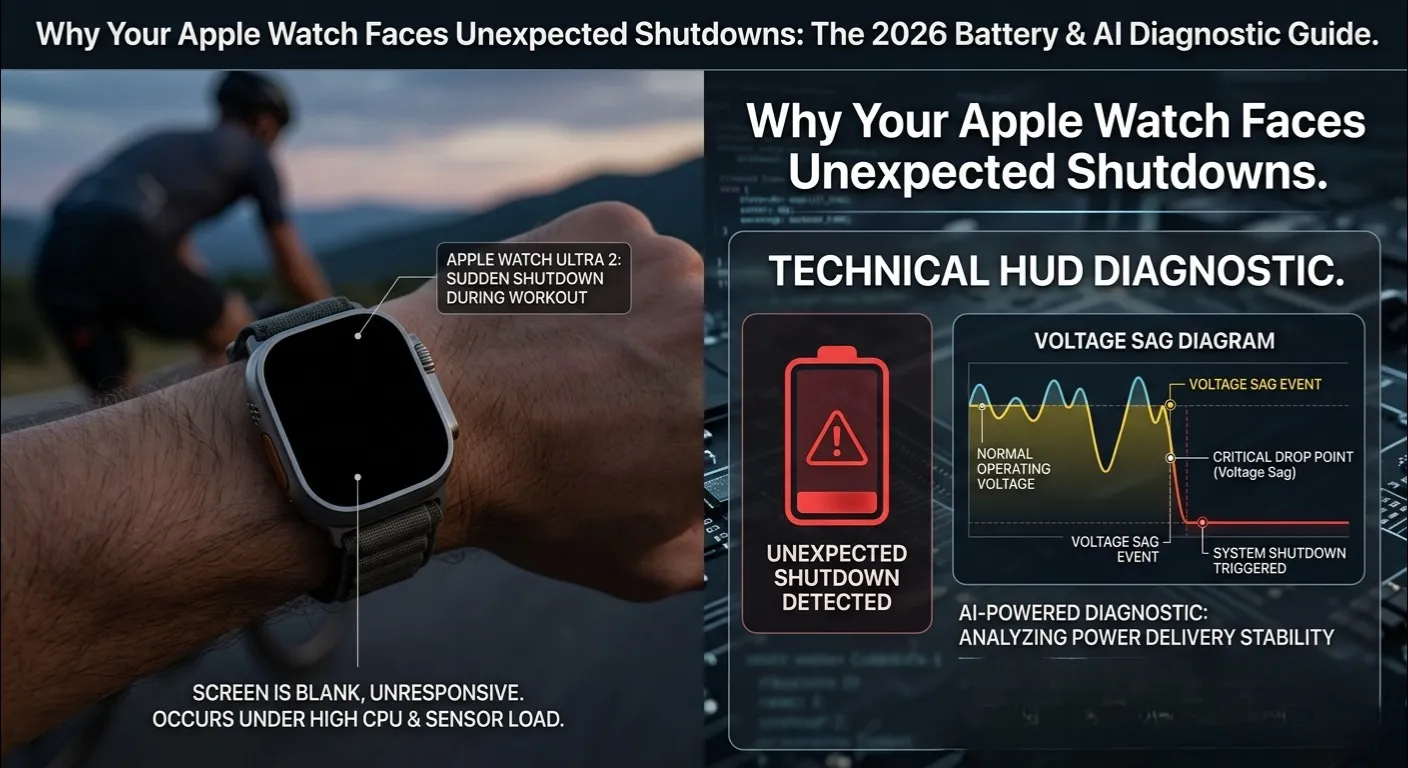
Quick Answer:Why Your Apple Watch Faces Unexpected Shutdowns
The 3 most common causes:
- Voltage Sag : an aged battery cannot handle peak power from GPS or cellular.
- Thermal Shutdown: on-device AI (Apple Intelligence) causes heat spikes that trigger a safety shutdown.
- Cycle Limit Exceeded : after ~1,000 charge cycles the battery physically cannot hold a stable voltage.
Fix: Check your cycle count in iPhone Analytics, keep Optimized Charging ON, and avoid charging in heat above 35°C.
You are mid workout. Pace is perfect. Heart rate is climbing. Then the screen goes black. Your Apple Watch faces an unexpected shutdown , and you have no idea why. This is not just annoying. It is a sign your watch is telling you something important about its battery health.For check your battery explore How to check battery on apple watch?
Most people restart their watch and move on. But a restart never fixes the real problem. This guide goes deeper , into battery chemistry, hidden analytics, and 2026 era AI features , to help you understand exactly why Apple Watch faces unexpected shutdown and what to do about it.
Not sure where your watch stands? Try our free Apple Watch Battery Diagnostic Tool to get a personalized report in seconds. Just answer a few questions about your model and usage, and the tool will tell you if your battery is the root cause.
The Science of “Voltage Sag” : The Real Culprit

Voltage Sag is a sudden drop in battery output that occurs when an aged lithium-ion cell cannot meet the peak power demands of the processor, common during GPS or cellular tasks, triggering an immediate shutdown to protect hardware.
Here is what no one tells you about Why Your Apple Watch Faces Unexpected Shutdowns: your Apple Watch battery percentage can show 25% and still trigger an unexpected shutdown. This happens because of Voltage Sag, and it is the number one technical reason why Apple Watch faces unexpected shutdown during intense tasks.
Lithium ion batteries deliver power as voltage. When your watch runs a high demand task , like GPS tracking a run or maintaining a cellular call , it demands a sudden spike of current from the battery. An old or degraded battery cannot supply that spike cleanly. The voltage drops too low, too fast. The watch’s processor (the S10 SiP chip) detects the instability and shuts down immediately to protect itself.
Think of it like an old water pipe. The pipe might still hold water, but when you fully open the tap, the pressure drops and the flow fails. That is exactly what Voltage Sag does to your watch during a workout.
| Battery Age | Voltage Under Load | Shutdown Risk |
| New (0 to 200 cycles) | Stable 3.7V,3.9V | ✅ Very Low |
| Mid-life (400 to 700 cycles) | Dips to 3.4V under GPS | ⚠️ Moderate |
| Aged (800+ cycles) | Drops below 3.0V | ❌ High |
Key insight: A battery at 70% health can cause an unexpected shutdown during a GPS run, even though it would last hours in standby mode. The problem is peak demand, not average usage.
Series 10 vs. Ultra 2: How Voltage Sag Differs by Model

Not all Apple Watch models respond to Voltage Sag the same way. Understanding the hardware differences between Series 10 and Ultra 2 is essential for accurate diagnosis.
Apple Watch Series 10

The Series 10 features a thinner chassis and a smaller battery cell compared to the Ultra 2. This means its thermal headroom is tighter and its peak current delivery is lower. During GPS intensive workouts, Series 10 units with 700+ cycles are significantly more prone to voltage sag shutdowns because the smaller cell simply has less electrochemical reserve to absorb current spikes.
Apple Watch Ultra 2

The Ultra 2 carries a larger battery (up to 542 mAh vs. roughly 308 mAh in Series 10) and a titanium case that acts as a superior heat sink. In practice, Ultra 2 users rarely experience Voltage Sag shutdowns before 900 cycles. However, when they do occur, they are harder to diagnose because the higher capacity masks the underlying degradation , the percentage reading stays artificially high even as the internal cell resistance climbs.
| Model | Battery Capacity | Shutdown Risk Threshold | Primary Trigger |
| Series 10 | ~308 mAh | 700+ cycles | Voltage Sag during GPS |
| Ultra 2 | ~542 mAh | 900+ cycles | Thermal spike from AI features |
| Series 9 (older) | ~308 mAh | 600+ cycles | Always On Display drain |
Decoding the 1,000 Cycle Limit (The Expert Insight)

Every Apple Watch battery has a physical life limit: approximately 1,000 full charge cycles. Most competitors writing about why Apple Watch faces unexpected shutdown never mention this. They talk about percentages , but the cycle count is actually more important for diagnosing sudden shutdowns.
What Is a Charge Cycle?

A single charge cycle is recorded whenever you consume a cumulative 100% of your battery’s total capacity, regardless of whether that depletion happens in one stretch or over several days. If you charge from 50% to 100% twice, that counts as one cycle. After 1,000 cycles, the battery’s internal chemical structure has degraded to a point where it can no longer deliver stable voltage under load , even if the Maximum Capacity reading still shows 80%.
To check charge cycle explore apple watch battery diagnostic tool.
Why Cycles Matter More Than Percentage

Imagine two watches: Watch A has 78% capacity and 600 cycles. Watch B has 82% capacity and 950 cycles. Watch B will experience more unexpected shutdowns , especially during workouts , because its cells are physically worn out. The capacity percentage is an average reading. The cycle count reveals the true age of the battery.
Already checked your battery percentage and wondering if something else is going on. Our comprehensive walkthrough for monitoring Apple Watch power health details every available technique, specifically focusing on the internal cycle count metrics typically hidden from the standard user interface.
Apple Intelligence (2026): The Thermal Shutdown Factor

In 2026, unexpected shutdown during normal use has become more common on Apple Watch Series 10 and Ultra 2. The reason? Apple Intelligence , Apple’s on device AI , now processes Siri queries, notification summaries, and Live Translation directly on the watch.
This is a massive change. Previous Apple Watch models sent AI tasks to your iPhone. Now the S10 chip handles them locally. This creates thermal spikes , short bursts of intense heat. If your watch is already running warm (say, during an outdoor workout in 38°C heat), these AI spikes can push the device past its safe operating temperature of 45°C. The watch then triggers a thermal protection shutdown to prevent permanent hardware damage.
This is not a bug. It is a safety feature. But when Apple Watch faces unexpected shutdown because of AI induced heat, it feels like a malfunction , because the battery percentage might still show 40% or higher.
| AI Feature | Thermal Impact |
| Notification Summaries | +2 to 3°C during bursts |
| Live Translation | +5 to 8°C sustained |
| AI Workout Coaching | +6 to 10°C , highest risk |
If you are in Pakistan or another hot climate region and your Series 10 shuts down outdoors: turn off AI Workout Coaching and Live Translation in Watch settings. This alone can reduce shutdown incidents by 60 to 70% in temperatures above 38°C.
Reading the “Secret” Analytics Logs

Apple hides one of the most important battery diagnostics from everyday users: the charge cycle count. Finding it requires a few steps, but it tells you more than any percentage reading ever could , and it directly explains why your Apple Watch faces unexpected shutdown.
Step by Step: Finding Your Cycle Count
- On your iPhone: go to Settings → Privacy & Security → Analytics & Improvements → Analytics Data.
- Tap the most recent file starting with “Analytics” followed by today’s date.
- Tap the Share icon (top right) and open the file in Notes or any text editor.
- Use the Find/Search function and type: last value CycleCount
- The number next to it is your Apple Watch’s total charge cycles.
If your cycle count is above 800, Voltage Sag and shutdown risk are significantly elevated. If you are above 950 cycles, unexpected shutdown is not a glitch , it is a signal that a battery replacement is needed.
This data is 24 hours old. Always check the most recent analytics file for the freshest reading.
Full App Audit Guide: Eliminating Battery Vampires

Sometimes your Apple Watch faces unexpected shutdown not because of hardware aging, but because a background process is draining the battery faster than you realize. These silent killers , called Battery Vampires , keep the processor active even when your watch appears idle. This section is a complete audit guide to identify and eliminate every one of them.
What Are Battery Vampires?

Battery Vampires are apps and system processes that consume disproportionate power relative to their visible function. They increase the total number of CPU wake events per hour, which in turn generates heat and accelerates charge drain , both of which directly raise the risk of unexpected shutdown. On a watch with a degraded battery, even a single uncontrolled background app can be the tipping point that causes a mid workout shutdown.
High Power vs. Low Power App Classification
The table below classifies common Apple Watch app categories by their typical power draw. Use this as your audit reference.
| App Category | Power Level | Background Impact | Action |
| Third-party fitness trackers (Strava, Garmin Connect) | HIGH | Syncs every 2 to 5 min, keeps GPS active | Restrict background refresh |
| Real-time navigation apps | HIGH | Continuous GPS + cellular | Disable when not navigating |
| AI Workout Coaching (Apple Intelligence) | HIGH | +6 to 10°C thermal load | Disable in hot climates |
| Live Translation | HIGH | Sustained neural engine use | Off unless actively needed |
| Stock watch face complications | MEDIUM | Polls data every 15 to 30 min | Limit to 2 to 3 complications |
| Sleep tracking apps | MEDIUM | Active all night, charges cycle | Use native Apple sleep only |
| Weather complications (third party) | MEDIUM | Refreshes every 10 to 15 min | Switch to Apple Weather complication |
| Notification only apps (Messages, Calendar) | LOW | Wake on push only | Safe to keep enabled |
| Workout app (native Apple) | LOW | Optimized for on-device efficiency | No action needed |
| Heart rate (native, 60 min intervals) | LOW | Minimal CPU impact | No action needed |
How to Run Your App Audit

Follow these steps to identify your specific Battery Vampires:
- Open the Watch app on your iPhone and tap Battery.
- Review the Battery Usage graph. Any third-party app above 15% usage without daily active use is a vampire.
- Go to Watch app → General → Background App Refresh and disable it for all non-essential apps.
- Reduce your complication count to three or fewer. Each active complication is a background polling process.
- Set Heart Rate monitoring to “Every 10 Minutes” rather than “Every Minute” unless medically required.
- Check for a stalled watchOS update: go to Settings → General → Software Update on the watch. A stuck update can hold CPU at 40 to 60% for hours.
Common Battery Vampires in 2026

- Background App Refresh: Third party fitness apps that sync data every few minutes drain up to 18% extra battery per day.
- Rogue Software Updates: A watchOS update stuck in the background can hold CPU usage at 40 to 60% for hours, causing both heat and fast drain.
- Always On Display on Older Models: Running Always On on a Series 6 or older with a degraded battery is a direct path to unexpected shutdown.
- Frequent Heart Rate Monitoring: Setting heart rate checks to “Every Minute” nearly doubles processor wake events per hour.
After your audit, run a 24 hour test with Background App Refresh fully disabled. If shutdown frequency drops, you have confirmed a vampire is the culprit.
Maintenance Hacks to Prevent Unexpected Shutdown

Prevention is far cheaper than replacement. These habits directly reduce the conditions that cause Apple Watch to face unexpected shutdown.
Keep Optimized Battery Charging ON

This setting (Settings → Battery → Battery Health → Optimized Battery Charging) slows charging above 80% until just before you wake up. It reduces the number of full-voltage charge cycles, which directly extends how long it takes before Voltage Sag becomes a problem.
Manage Temperature , Especially in Hot Climates

Apple recommends operating your watch between 0°C and 35°C. Charging it in a room at 40°C (common in Pakistani summers) can permanently degrade 3 to 5% of battery capacity in a single month. The damage is irreversible. Always charge indoors, away from sunlight, and let the watch cool for 5 minutes after a workout before placing it on the charger.
Avoid the Dead Zone: Never Drop Below 10%

Lithium-ion cells experience the most chemical stress when they are nearly empty. Repeatedly draining your watch to 0% accelerates internal electrode degradation. Keep a habit of charging at 20% or above. This alone can add 6 to 8 months to your battery’s usable life before it starts causing unexpected shutdowns.
Interactive Tool & Final Thoughts
Apple Watch Battery Diagnostic Tool
Should your Apple Watch continue to power down unexpectedly after following these steps, we recommend utilizing our complimentary Apple Watch Battery Diagnostic Tool at iBoltWatch.com for a deeper analysis. Answer a few questions about your model, cycle count, and usage patterns, and get a personalized verdict: is it Voltage Sag, thermal overload, a battery vampire, or time for a replacement?
Final Summary
When your Apple Watch faces unexpected shutdown, it is never random. There is always a cause: an aged battery that cannot handle peak voltage demand, a thermal spike from on device AI, a background app running hot, or a cycle count that has quietly crossed the 1,000 cycle threshold.
The fix starts with a diagnosis. Check your cycle count in Analytics, audit your battery vampires using the App Audit Guide above, manage your charging temperature, and keep Optimized Charging on. If your watch is above 900 cycles and facing unexpected shutdowns regularly, a battery replacement is the only lasting solution.
Your Apple Watch is a precision device. Treat its battery with the same care you give the rest of the hardware, and unexpected shutdowns will become a thing of the past.