| Quick Answer :Apple Watch Screen Glitching Green Lines? Don’t panic yet. A soft green tinge or flicker is usually just a software bug that can be fixed by restarting. But one solid, unmoving green line across the display usually means real hardware damage inside the OLED panel. |
That green flash on your wrist can ruin your morning. One second your watch looks fine. The next, apple watch screen glitching green lines, and your mind jumps to the worst.
Here’s the good news. Not every green line means a broken screen. Sometimes it’s just watchOS acting up. Other times, yes, it’s the display panel.
This guide gives you a 10 second test to figure out which one you own, explains why your apple watch screen glitching green lines, and offers real fixes you can try today.
Quick Diagnosis: Software Bug or Hardware Damage to OLED?

Before you spend your money on repairs, Do a quick check. It takes 10 seconds and it will tell you exactly what is wrong with your Apple Watch screen glitching green lines.
Speaking of quick checks, we also built a simple Apple Watch battery diagnostic tool. It’s free, and it runs in seconds. If overheating or fast charging is behind your Apple Watch screen glitching green lines, this tool helps you catch battery problems early, before they turn into a cracked display too. Try the battery diagnostic tool using the button below.
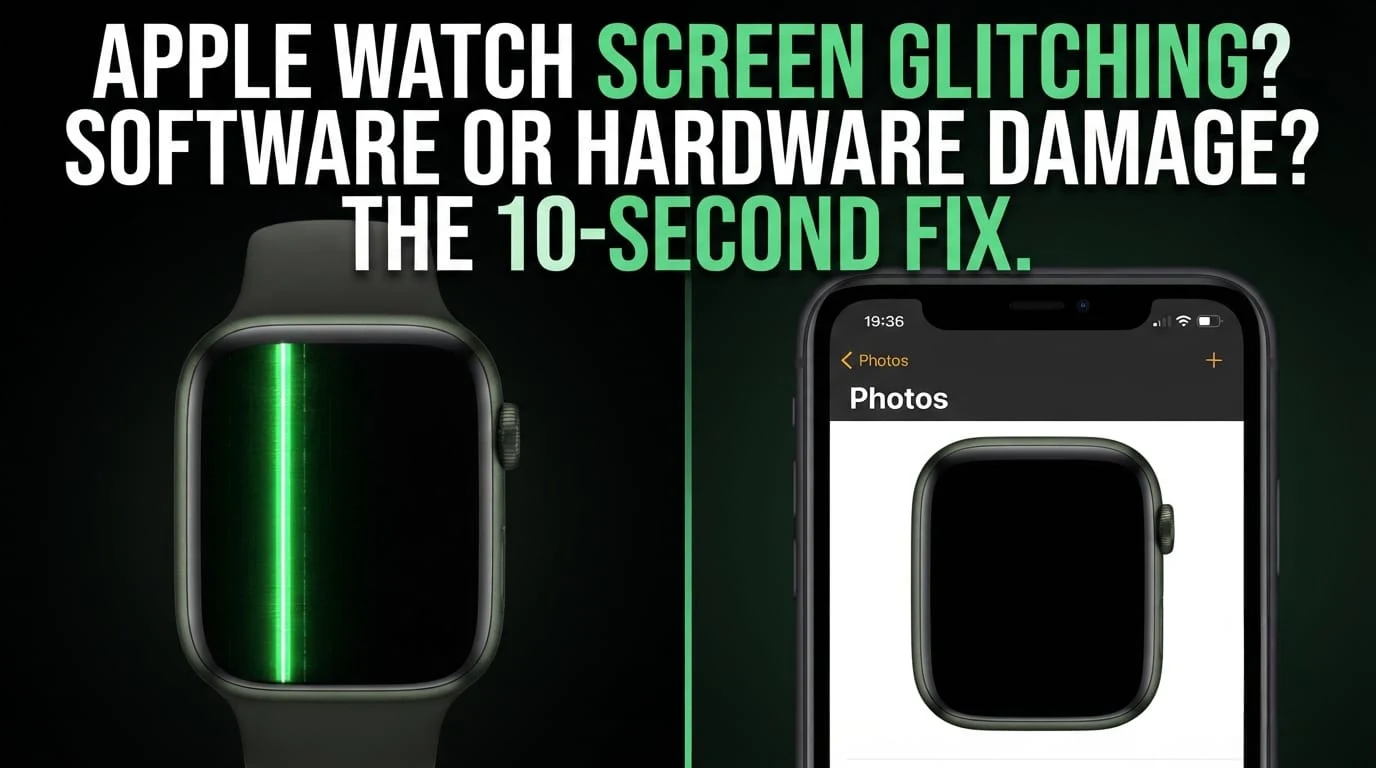
The 10 Second “Screenshot Test” (Instant Diagnostic Trick)

Here’s the trick. Press the Digital Crown and the Side button together for one second. This takes a screenshot on your Apple Watch.
Now open the Photos app on your paired iPhone. Look at the screenshot closely.
If the green line shows up IN the screenshot, relax a little. That’s a software bug and it can be fixed.
If the screenshot appears clean, with no green line at all, that is not good news. It means the Apple Watch screen glitching green lines you’re seeing is physical damage, not software. (If tapping on the screen stopped working as well, that’s another issue to look into in our guide on why the Apple Watch is not responding to touch.
Green Tint/Flicker vs Vertical Green Line: What’s the Difference?

Not all green issues are equal. Here’s a quick overview:
- A thin, bright solid line that doesn’t shift position usually means hardware damage.
- A soft green glow or flicker that comes and goes is often a software bug, especially after a watchOS update.
- A line that appears only during animations or app switching is a graphics rendering bug, not a broken panel.
- A green tint across the whole screen is usually a temperature related software glitch.
This breakdown covers pretty much every version of Apple Watch screen glitching green lines you’ll come across.
Root Causes: Why Is Your Apple Watch Display Showing Green Lines?

Now, let’s get into why this actually happens. Modern Apple Watches utilise OLED and LTPO display panels, not old style LCDs. That’s an important detail, because OLED pixels behave differently when damaged, and it’s part of why Apple Watch screen glitching green lines shows up the way it does.
OLED Flex Cable Damage & Physical Impact

Every OLED screen sits on a thin flex cable. Drop your watch, or knock it against a doorframe, and tiny fractures can form.
Even an invisible fracture disrupts pixel signals. The result: apple watch screen glitching green lines vertically.
Water Intrusion & Internal Component Corrosion

Apple Watches are water resistant, not waterproof forever. Seals wear down over years of swimming and showering.
Once moisture creeps in, it corrodes the tiny display pins. That bad signal shows up as apple watch screen glitching green lines.
Thermal Stress & Overheating During Fast Charging

Fast charging generates heat, a lot of it. Charge under a pillow or in direct sun, and that heat has nowhere to go.
Sustained heat stresses delicate OLED pixels. This is one of the sneaky causes behind Apple Watch screen glitching green lines that people rarely suspect.
watchOS Graphics Rendering Bugs & Driver Glitches

Sometimes it isn’t hardware at all. A buggy watchOS update can mess with how the display renders colors.
This shows up as flickering, tinting, or brief green lines during animations. The fix is usually simple software troubleshooting, nothing scary. If your watch instead freezes on setup, that’s a different bug covered in our post on Apple Watch stuck on verifying.
How to Fix Software Based Apple Watch Green Screen Issues (DIY Fixes)

Good news: most software related Apple Watch screen glitching green lines problems can be solved at home, free, in a few minutes.
Fix 1: Hard Reset Your Apple Watch

Press and hold the Digital Crown and Side button at the same time for about 10 seconds or until you see the Apple logo on the screen. That refreshes the memory and clears whatever bug caused the green flicker.
Fix 2: Turn Off Always On Display & Adjust Brightness

Open Settings > Display & Brightness. Turn the Always On Display off, wait a few seconds and then turn it back on.
This will refresh the display graphics driver. Sounds small, but it clears minor rendering glitches.
Fix 3: Enable “Sleep Focus” Mode (Temporary Buffer Reset)

Turn on Sleep Focus from Control Center for a time then turn it off again.
This action resets the screens display buffer completely which can fix a green line that appears because of one frozen frame.
Fix 4: Unpair and Re Pair Your Apple Watch, with iPhone

Open the Watch app tap your watch at the top tap the info icon, then select Unpair Apple Watch.
Decide if you want to restore your device from a backup or set it up as a new Apple Watch.
This wipes any corrupted files an older update left behind. If some apps also refuse to install after this, our guide on why apps are not installed on Apple Watch covers that separately.
Fix 5: Update to the watch OS version

Open the Watch app then go to General, then Software Update.
Apple often patches graphics bugs quietly. If your Apple Watch problem started after an update a newer update may already have the fix for the Apple Watch.
Fix 6: Factory Reset and then set up the Apple Watch as a device

As a resort you can go to the Settings on the Apple Watch then go to General then go to Reset and then go to Erase All Content and Settings on the Apple Watch.
This will clear every software cause of the green lines on the Apple Watch screen before you think it might be a hardware problem, with the Apple Watch.
What to Do If It Is a Physical Hardware Green Line?

Ran the screenshot test and it came back clean? That confirms real Apple Watch screen glitching green lines from hardware, and no software trick will fix that.
Can a Physical Green Line Be Fixed with Software?

No, honestly. A cracked flex cable or damaged OLED pixel is a physical fault. No restart, update, or reset touches that.
Anyone promising a software fix for confirmed hardware damage is either misinformed or selling you something useless.
How to Stop a Single Green Line From Spreading Across the Screen

You can slow it down though. Don’t press on the screen. Make sure it is not near very hot things or in direct sunlight. Don’t go swimming. Take a shower with it until it is fixed because water makes the damage worse. Be careful with it. Have it checked as soon, as possible. If the screen turns off completely instead, that’s a different fault explained in why does Apple Watch screen go black randomly.
Repair Options & Replacement Cost Realities

Repairing confirmed Apple Watch screen glitching green lines can be costly, depending on your model and warranty status.
Apple Official Repair vs. Third Party Screen Replacement
| Option | Cost | Pros | Cons |
| Apple (AppleCare+) | Low fixed fee, often $0 to $70 | Genuine parts, water resistance kept | Only valid if plan is active |
| Apple (Out of Warranty) | $250 to $500+ depending on model | Genuine parts, reliable service | Expensive for older watches |
| Third Party Repair Shop | $80 to $200 typically | Cheaper, faster turnaround | Often breaks water resistance seal |
Decision Framework: Is It Worth Repairing Your Older Apple Watch?
Simple rule: if the repair cost is than half the watches resale value don’t repair it.
Put that money toward a refurbished or newer model instead. It’s the move long term.
Frequently Asked Questions (FAQ)
Can a software update cause a green line, on Apple Watch?
Yes, sometimes. A buggy watchOS update can trigger temporary Apple Watch screen glitching green lines through faulty rendering. This usually clears with a restart or the next patch, unlike permanent hardware damage.
Will Apple replace an Apple Watch with a green line for free?
You can get your Apple Watch fixed for free only if you have AppleCare+ or if it is a problem that happened when it was made. Otherwise you have to pay for the repairs yourself. That can be very expensive.
Is the Apple Watch still waterproof if it has a line on the screen?
No it is not waterproof anymore. If you see a line on the Apple Watch screen that means there is a problem with the hardware and the screen is not sealed properly. You should not get the Apple Watch wet until you get the screen fixed by a professional.
Does the Apple Watch have an LCD or OLED display?
The new Apple Watches use OLED and LTPO technology they do not use LCD. That is why when the screen is not working right you see problems with the pixels, not the light, in the background. The Apple Watch screen is made with OLED, which is why it looks like that when it is glitching.